

Is your Supabase app readable by anyone?

If your app runs on Supabase, there is a key sitting in your frontend code right now. Anyone who opens your site can find it in a few seconds.
That part is fine. Supabase designed it that way. What is not fine is what that key can do if one setting is off, and in a lot of AI-built apps I look at, it is off ... welp! hold your cocktails folks, this is going to be wild.
How Supabase works in one minute
In a normal app, your frontend talks to your backend and your backend talks to the database. The backend decides who gets to see what.
Supabase skips the middle part. Your frontend talks to the database directly through an API that Supabase generates for you. That is a big reason why tools like Lovable and Bolt like it so much, because you can build a working app without writing a backend at all.
So if there is no backend, who decides that user A cannot see user B's orders?
The answer is Row Level Security, or RLS. It is a set of rules that live inside the database itself and get checked on every request. The public key gets you through the front door. RLS decides which rooms you can walk into.
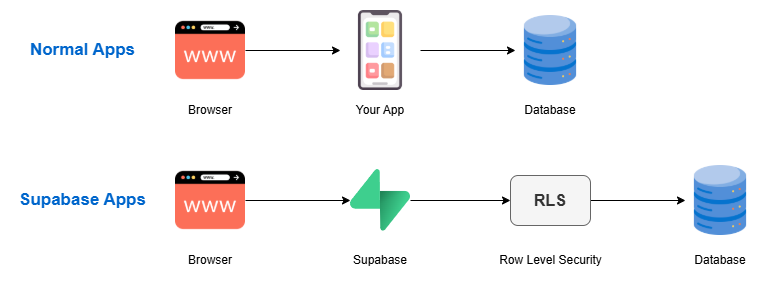
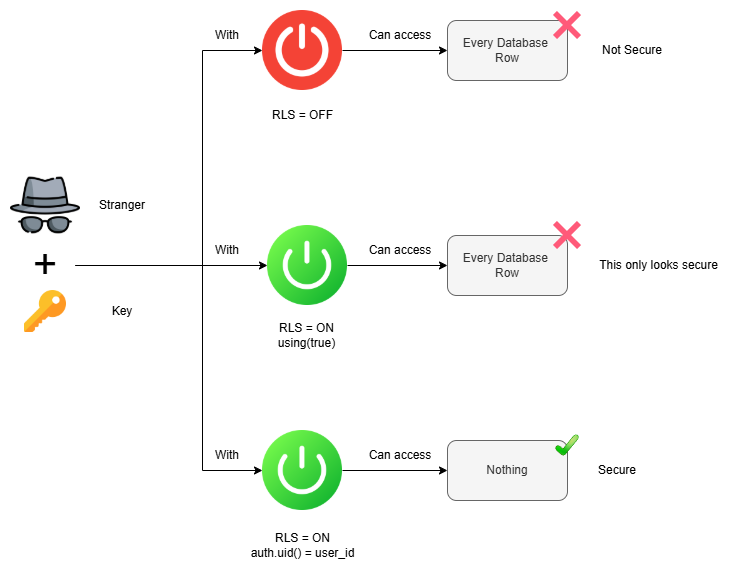
If RLS is off on a table, there is nobody checking at all. Anyone with your public key can read that table, and depending on the setup, they can write to it too.
This is not a hypothetical
In 2025 a security researcher scanned around 1,645 apps built with Lovable and found about 170 of them with Supabase tables exposed this way. GADDAM I say!
It got its own CVE (CVE-2025-48757). Some of the exposed data reportedly included home addresses, debt amounts and API keys.
None of those founders thought their data was public. The app worked, the login worked and the dashboard looked great. Remember, a demo has to work once, a product has to work when someone is poking at it on purpose.
I myself found this problem first hand in a Lovable built app which one of my clients built. The app looked perfect and the client seemed proud of it. I audited the application on the basis of operations and code quality both and found around 300 bugs, security vulnerabilities, data inconsistencies and all kinds of marvelous things.
The five ways it usually goes wrong
- RLS is simply off. When you create a table from the Supabase dashboard, RLS is turned on by default. When a table is created with SQL or a migration, it is not. Guess how AI coding agents usually create tables 😄
- RLS is on, but the policy allows everything. When RLS is on and there are no policies, nobody can read anything. The app breaks, the AI sees an error and "fixes" it by adding a policy that says
using (true). The error is gone, and so is your protection. It looks secure in the dashboard because RLS shows as enabled. - Users can edit their own role. A common setup is a
profilestable with anis_adminorrolecolumn, and a policy that lets users update their own row. That policy usually covers every column in the row, includingis_admin. One request from the browser console and a normal user becomes an admin. - The secret key is in the frontend. Supabase has two kinds of keys. The publishable key (the older name is the
anonkey) is meant to be public. The secret key (the older name isservice_role) skips RLS completely and must only live on a server. I have seen the secret key pasted into frontend code because "the other one gave a permission error". - Views ignore your rules. A database view is like a saved query. By default, Supabase views run with the permissions of the person who created them, not the person asking, so they skip RLS. You can lock down a table perfectly and then leak it through a view built on top of it.
Check your own app in 10 minutes
You do not need to be an engineer for most of this. But only do it on an app you own.
Open the Security Advisor. In the Supabase dashboard, go to Advisors and then Security Advisor. It flags tables in the public schema that have RLS turned off. If it shows anything in red, start there.
Read your policies. Go to Authentication and then Policies. For every table, read each policy. Tedious, I know, but sure as heck worth it. If you see true on its own where a condition should be, that table is open to whoever the policy applies to.
Search your frontend for the secret key. Open your site, press F12, go to the Sources tab and search for service_role and sb_secret_. If either one shows up, rotate that key today.
Try it as a stranger. This is the real test. Log out, copy your project URL and the publishable key, and run this in a terminal (swap in your own values and a table name):
curl "https://YOUR-PROJECT.supabase.co/rest/v1/profiles?select=*"
-H "apikey: YOUR_PUBLISHABLE_KEY"
If you get back other people's data, so can anyone else on the internet. An empty list [] is what you want to see for anything private.
Check your role column. If users have a role or is_admin field, log in as a normal user and try to update it from the browser. If it works, move that field to a table that only your server can write to.
What a good policy looks like
Here is the shape of a policy that lets people read only their own orders:
alter table orders enable row level security;

create policy "Users can read their own orders" on orders for select to authenticated using ((select auth.uid()) = user_id);
In plain English, this means a logged-in user can read a row only if the user_id on that row is their own. People who are not logged in get nothing.
Every table that holds private data needs a policy like this for each action you allow (read, insert, update and delete). If you are not sure what a table needs, leave RLS on with no policy until you are. A broken feature is a much better problem to have than a leak.
Why I care about this one
I built an accounting system on Supabase where accountants, approvers and admins each had to see different data, with an audit trail behind every change. On that kind of project, access rules are the first thing you design, not the last thing you patch. Most prototypes get built the other way around, which is fine for a demo and dangerous for a product.
If you ran these checks and something came back that you do not like, or you are not sure what you are looking at, message me on LinkedIn or email me at mhammad.hassan002@gmail.com. I will tell you what I would fix first.
About the author
- I'm a software engineer focused on building software, AI systems, and automation that solve real business problems. I write about software engineering, AI, automation, system design, and the lessons I learn from building and working with real-world systems. I care less about using technology for its own sake and more about understanding where it actually creates value.
Comments
Join the discussionNo comments yet. Be the first to comment.
Journey of a Software Engineer
A running log of my journey as a software engineer which contains the things I learn, build, question, get wrong, and eventually understand. I'm not the guy who has all the answers. But I sure as heck am the person who dives first, thinks later and improvises along the way. This is just my ongoing exploration of software, AI, automation, systems, and everything in between.